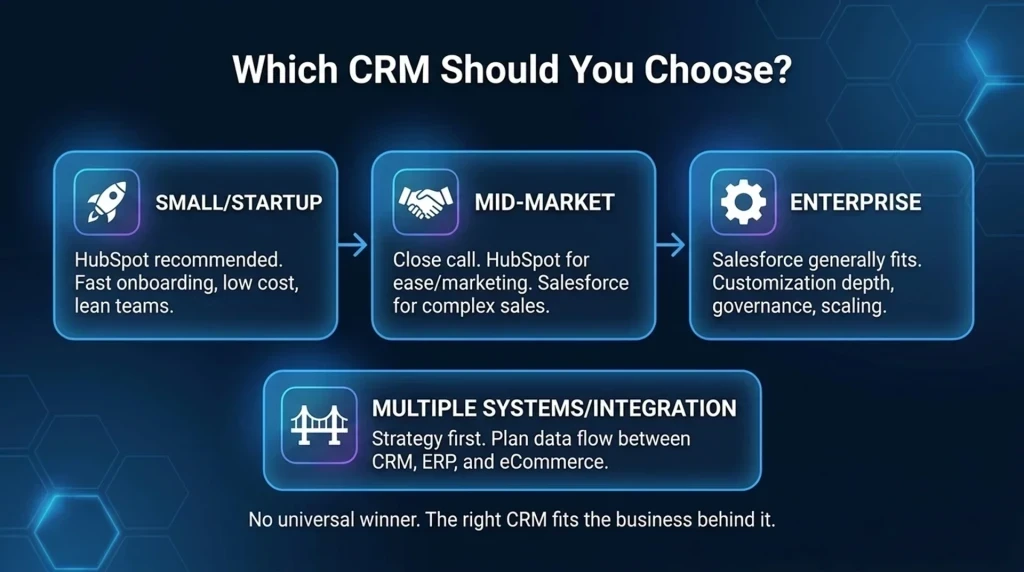
No single enterprise CRM suits every organization in 2026: Salesforce Enterprise remains the benchmark for highly customized, multi-cloud global architectures; Microsoft Dynamics 365 Sales provides the best total cost of ownership for organizations committed to Azure, Teams, and Copilot environments; and HubSpot Smart CRM leads for rapid go-to-market alignment and usability with minimal administrative overhead. Up to 70% of enterprise CRM implementations fail to meet their objectives, driven not by missing software features, but by adoption barriers, unscrubbed data, and implementation costs spanning $150,000 to over $1.5M. For technology leaders and procurement committees, navigating this market requires evaluating platforms as core business architecture rather than feature checklists.
Enterprise CRM Platform Verdicts by Core Business Need
For complex global organizations requiring deep customization and ecosystem breadth, Salesforce Enterprise is the top choice. For Microsoft-centric IT environments seeking integrated Copilot workflows and lower administrative burden, Microsoft Dynamics 365 Sales leads. For mid-market and scaling enterprises prioritizing rapid sales adoption and unified go-to-market teams, HubSpot Smart CRM delivers the fastest time-to-value.
Selecting enterprise software begins by dismantling the assumption that a single, universal CRM platform fits every commercial profile. The operational demands of a global conglomerate operating across multiple continents diverge sharply from a high-velocity mid-market firm seeking unified marketing and sales visibility. High-end platforms offer immense programmatic extensibility through dedicated developer frameworks and expansive application ecosystems, but that power demands continuous engineering oversight, rigid release governance, and high ongoing administrative overhead.
Conversely, platforms prioritizing rapid deployment deliver accelerated user adoption and unified customer data models out of the box, yet they may enforce structural boundaries on custom database schemas and complex multi-instance subsidiaries. Enterprise decision-makers must evaluate these architectural tradeoffs against organizational operating models:
- Salesforce Enterprise: Best for global enterprises requiring deep custom data models, multi-cloud architectures, extensive third-party app ecosystems, and programmatic process automation supported by dedicated developer teams.
- Microsoft Dynamics 365 Sales: Best for enterprises standardized on Microsoft 365, Azure, and Teams that want to deploy native Copilot capabilities while reducing administrative overhead through centralized IT identity and access management.
- HubSpot Smart CRM: Best for mid-market and scaling enterprises prioritizing cross-functional alignment across marketing, sales, and service with accelerated deployment horizons and minimal administrative maintenance.
- Zoho CRM: Best for cost-conscious enterprises seeking expansive feature coverage, multi-channel communication tools, and workflow flexibility without enterprise tier pricing structures.
Head-to-Head Comparison Across Pricing and Architecture
Evaluating enterprise platforms requires balancing published entry-level licensing against true architectural governance, implementation schedules, and operational dependencies. The comparison below benchmarks baseline list pricing against realistic delivery windows and primary infrastructure alignments.
CRM Platform |
Entry Enterprise Price |
50-Seat Realistic Annual TCO |
Implementation Timeline |
Primary Ecosystem Fit |
|---|---|---|---|---|
Salesforce Enterprise |
$175 USD/user/month |
$120,000–$200,000/year |
6 to 9 months |
Multi-Cloud, Custom Extensibility, Global Orgs |
Microsoft Dynamics 365 Sales |
$105 USD/user/month |
$46,800–$80,000/year |
3 to 6 months |
Microsoft 365, Azure, Microsoft Copilot |
HubSpot Sales Hub Enterprise |
$150 USD/seat/month |
$54,000–$72,000/year (Pro benchmark) |
3 to 4 months |
Unified Go-To-Market, Rapid Usability |
Zoho CRM |
Budget tier pricing |
$24,000–$36,000/year |
1 to 3 months |
Cost-Conscious Scalability, Multi-Channel |
Standard and enterprise tiers diverge substantially in audit logging, API concurrency thresholds, and custom object limits. Organizations transitioning from commercial mid-market tiers into enterprise agreements must budget for strict security boundaries, sandboxes, and administrative tooling rather than base seat counts alone.
Three-Year TCO Realities: What Enterprise Software Actually Costs
Licensing fees represent only a minority of real CRM expense. Over a three-year horizon, enterprise Total Cost of Ownership (TCO) incorporates consulting partners ($150,000 to $1.5M+), dedicated administrators, integrations, and AI consumption credits. For a 50-person sales team, realistic annual TCO ranges from $24,000–$36,000 for Zoho to $120,000–$200,000 for Salesforce Enterprise.
Advisory specialists at Huble emphasize that enterprise CRM selection is a business-architecture decision rather than an off-the-shelf software purchase. Evaluating software purely through headline per-user license fees obscures the substantial capital required to configure, maintain, and govern complex sales platforms over time. Organizations must utilize Three-Year TCO Modeling to forecast total expenditures across candidate platforms before executing multi-year contracts.
Budget Warning: Unplanned integration maintenance, custom field technical debt, and system administrator salaries frequently double original budget forecasts. Procurement teams should add a mandatory 20% contingency buffer to any initial three-year TCO model before signing contracts.
Calculating Hidden Operational Costs in the 50-Seat Benchmark
Examining an enterprise sales team of 50 users reveals how operational dependencies shape overall software expenditure. On Salesforce Enterprise, base licensing represents only the foundation of the budget. Achieving enterprise-grade governance requires certified system administrators, developer support for custom Apex and flows, and continuous integration maintenance. As industry cost analyses document, these administrative requirements elevate realistic annual ownership for a 50-person deployment to between $120,000 and $200,000 per year.
Microsoft Dynamics 365 Sales presents an alternative cost structure. With base enterprise seats listed at $105 USD/user/month, a 50-seat deployment generates an annual run rate of $46,800 to $80,000 per year. Organizations capitalize on existing Microsoft Azure and Active Directory infrastructures, reducing specialized administrative headcount by distributing user management across existing enterprise IT teams.
Mid-market oriented architectures shift this dynamic further. A 50-seat benchmark on HubSpot Professional incurs an annual run rate of $54,000 to $72,000 per year, driven down by minimal custom engineering requirements and intuitive administrative interfaces that allow sales operations managers to maintain the system without dedicated developers. For budget-constrained organizations, Zoho CRM operates at $24,000 to $36,000 per year for 50 users, delivering functional breadth with minimal administrative overhead.
Auditing Agentic AI Consumption, Tokens, and Add-On Licensing
Autonomous agent capabilities introduce consumption-based volatility to enterprise CRM budgeting. Modern platforms have evolved beyond basic predictive scoring, deploying autonomous agents that interpret unstructured inputs, draft personalized communications, and execute multi-step database updates. However, these systems operate under distinct commercial models that demand strict pre-purchase auditing.
Salesforce structures autonomous agent deployment through consumption credits for Agentforce, requiring organizations to pay based on automated interaction volume, task completions, and data processing cycles. Microsoft Dynamics 365 Sales incorporates Copilot capabilities through per-user monthly add-on licensing alongside underlying Azure consumption frameworks. HubSpot pairs native agentic features into core seat tiers while establishing metered boundaries around heavy programmatic execution. Without contractual usage caps and token monitoring, autonomous agent deployments can generate substantial unbudgeted operational expenditures.
Data Governance Requirements for Enterprise AI Readiness
Industry research shows that 45% of enterprise CRM systems are completely unprepared to support native AI in 2026. While vendor demonstrations showcase autonomous agents routing opportunities and orchestrating pipeline actions, real-world deployment depends entirely on clean, structured, and validated data architectures.
Operational data fragmentation carries measurable commercial consequences. Surveys indicate that 85% of sellers admit making embarrassing mistakes with prospective clients due to faulty CRM records, such as duplicate contact entries, outdated company hierarchies, and inaccurate opportunity states. When dirty data enters automated environments, downstream reporting, pipeline forecasting, and algorithmic models amplify those underlying errors.
Data Integrity Risk: Autonomous AI agents act directly on record fields and trigger downstream workflows. Feeding unscrubbed contact data, duplicate accounts, and conflicting pipeline stages into AI models guarantees automated hallucinations, erroneous customer communication, and severe brand liability.
Research firm Everest Group emphasizes in its 43-page CRM platforms evaluation that enterprise systems must serve as a governed execution layer and a scalable foundation for autonomous agents rather than passive record repositories. Preparing an enterprise environment requires establishing strict validation rules, programmatic field deduplication, consistent opportunity taxonomy, and granular field-level permissions before enabling automated workflows.
Beating the 70% Failure Rate with Phased Rollouts
Implementation audits confirm that up to 70% of enterprise CRM deployments fail to achieve their defined business objectives. These failures rarely stem from missing software capabilities. Instead, implementations falter due to process misalignment, change management friction, and excessive technical complexity that repels end users.
When organizations deploy over-engineered systems that disrupt daily sales motions, user abandonment follows. Across the enterprise sector, revenue teams typically utilize only 22% of deployed CRM features after launch, bypassing mandatory fields and reverting to offline spreadsheets. As industry analysts at CRM Force observe:
“The best CRM is the one your sales team will actually use. An enterprise platform that goes unloved is a liability, not an asset.”
Enterprise consultancy Huble reinforces this principle when evaluating why enterprise investments miss projected returns:
“Most enterprise CRM failures are adoption failures, not technology failures. Change management is what converts licence spend into ROI.”
The Phased Rollout Blueprint from Pipeline to Predictive AI
Enterprise deployments typically require 3 to 9 months to reach full organizational maturity. High-performing organizations avoid high-risk big-bang launches by executing a structured Three-Phase Rollout Strategy that balances immediate utility with long-term architectural stability:
- Phase 1: Core Foundation (Weeks 1 to 8): Focus exclusively on clean account and contact management, primary pipeline stages, basic activity tracking, and standardized management reports. The single objective is securing daily user adoption and high data integrity among frontline reps.
- Phase 2: Workflow Automation and Productivity (Months 3 to 4): Introduce automated email synchronization, document generation, quotation approvals, standardized notification triggers, and integrated executive dashboards.
- Phase 3: Advanced Intelligence and Deep Integrations (Months 5 to 6+): Activate predictive lead scoring, autonomous agentic workflows, complex bidirectional ERP integrations, and cross-departmental data analytics once baseline data hygiene is proven.
Enforcing ‘Configure, Don’t Customize’ to Safeguard Usability
A primary driver of project failure is the temptation to rewrite standard CRM workflows using bespoke code. While platforms like Salesforce offer unlimited programmatic potential through custom code, excessive custom development introduces heavy technical debt. Bespoke code frequently breaks during quarterly vendor platform updates, inflates regression testing cycles, and complicates future system migrations.
Adhering to the “Configure, Don’t Customize” principle protects project viability. Enterprise teams should rely on standard declarative functionality, native page layouts, and low-code workflow builders before authorizing custom code. Preserving native user interface conventions maintains high system responsiveness, simplifies user onboarding, and ensures the platform remains adaptable as commercial requirements evolve.
Integration Architecture and Enterprise Middleware Realities
Enterprise CRM platforms cannot function as isolated data silos. Their strategic value depends on reliable, bidirectional synchronization with core enterprise resource planning (ERP) engines, customer billing systems, and operational data warehouses.
Ecosystem alignment heavily dictates integration complexity. Platforms like SAP Sales Cloud offer direct, native connectivity with SAP S/4HANA and SAP SuccessFactors environments, while Oracle CX Sales natively aligns with enterprise Oracle backbones. When enterprises deploy platforms such as Salesforce Enterprise or Microsoft Dynamics 365 outside their native ERP stacks, deploying enterprise middleware becomes mandatory. Platforms like MuleSoft and Workato manage complex data transformations, API concurrency, and transactional queues between disparate systems.
Consultancy Huble highlights how integration demands are reshaping enterprise software strategy:
“Platform consolidation is the dominant 2026 trend: enterprises are replacing fragmented point-solution stacks with unified platforms to cut costs and unify customer data.”
To avoid severe post-launch disruptions, enterprise procurement teams must evaluate architectural constraints prior to signing agreements:
- API Concurrency and Daily Rate Limits: Verify vendor-enforced API call caps, bulk export windows, and webhook throttling thresholds across enterprise tiers to prevent synchronization failures during peak financial close periods.
- Middleware Infrastructure Overhead: Include dedicated middleware licensing (such as MuleSoft or Workato) and specialized integration consulting in the baseline three-year budget when connecting cloud CRMs to legacy backbones.
- Point-Solution Stack Consolidation: Audit redundant third-party point solutions—such as standalone sales engagement tools, conversational tracking apps, and forecasting utilities—that can be retired in favor of native enterprise CRM functionality.
Matching Organizational Needs to the Right CRM Platform
Procurement committees frequently compromise CRM success by buying ahead of complexity. When an organization operates with straightforward sales motions, a single customer-facing team, and a concise integration footprint, purchasing top-tier enterprise platforms introduces rigid governance machinery that becomes pure administrative overhead. Sales velocity slows, administrative costs compound, and users abandon the tool.
When requirements fall outside the dominant market leaders, several specialized enterprise contenders deliver distinct architectural strengths:
- Creatio: Provides a flexible no-code architecture designed for operations teams that require custom workflow design, high process configurability, and rapid application assembly.
- SugarCRM: Delivers robust predictive analytics and automated pipeline modeling tailored for data-driven sales organizations seeking deep forecasting intelligence.
- Pipedrive: Focuses strictly on sales pipeline velocity, offering an intuitive, activity-based interface that maximizes adoption for dedicated sales teams without enterprise administrative bloat.
Shortcut: Accelerate vendor selection by utilizing a structured 30-day technology evaluation sprint. Allocate days 1 through 10 to core business requirements and workflow scoping, days 11 through 20 to vendor demonstrations using scrubbed organizational data, and days 21 through 30 to commercial MSA negotiations, 30-day trial testing (available on platforms like Zoho and Salesforce), and final TCO sign-off.
During commercial negotiations, procurement teams must de-risk contracts by negotiating contractual caps on annual subscription price escalations, securing clear data ownership clauses that guarantee uncompressed relational data extraction rights upon exit, and confirming that necessary development and testing sandboxes are fully included in enterprise licensing tiers.
FAQ
How are autonomous Agentic AI capabilities priced in enterprise CRM platforms in 2026?
Enterprise vendors employ hybrid pricing models. Salesforce pairs core licensing with consumption credits for Agentforce, Microsoft Dynamics charges per-user add-on fees for Copilot, and HubSpot integrates AI into seat tiers, requiring buyers to model token and interaction volume before signing.
What is the primary driver of enterprise CRM implementation failure?
Up to 70% of implementations fail due to adoption, data hygiene, and organizational change barriers rather than software feature deficits. When systems are over-customized, users reject the software, leaving only 22% of deployed capabilities utilized.
How long does a standard enterprise CRM implementation take?
Enterprise deployments typically take 3 to 9 months. Organizations achieve significantly higher success using a three-phase rollout: foundation and contact tracking in weeks 1–8, workflow automation in months 3–4, and advanced AI and integrations in months 5–6+.
What does ‘buying ahead of complexity’ mean in enterprise CRM selection?
It occurs when organizations with straightforward sales processes purchase top-tier enterprise platforms. The resulting release governance, rigid permission hierarchies, and full-time administrative overhead create unnecessary friction, resulting in a slower system than what it replaced.